
Call Back Requests
Collect a name, phone or email, best time, and source page from visitors who are ready for help.
Add a mobile-friendly action widget for callbacks, reviews, offers, FAQs, bookings, and quotes without rebuilding the site.
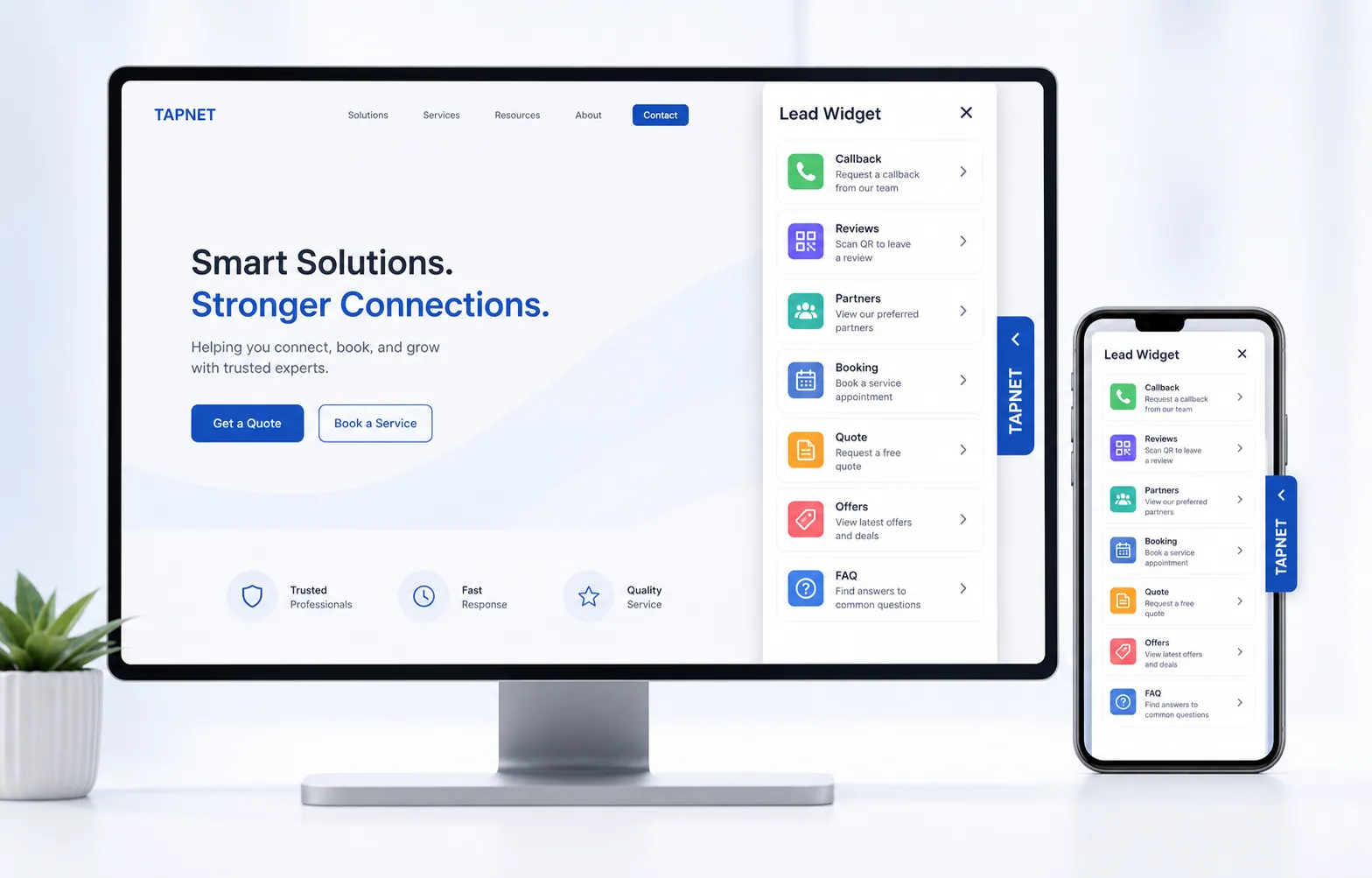
The widget gives visitors a clear action path first, can surface trusted Preferred Partners when the profile has them, and keeps captured leads visible in TAPNET so the business can respond faster.
When a business adds Preferred Partners in its TAPNET profile, the Lead Widget can show those recommendations as a visitor-friendly Partners tab and persistent chip. The visitor sees complementary businesses the profile owner actually recommends, while TAPNET tracks partner impressions and profile clicks from the widget.
Each module has a specific job in the visitor journey: get contact details, build trust, answer a buying question, or route a higher-intent request.
Collect a name, phone or email, best time, and source page from visitors who are ready for help.
Let customers scan or tap to open the preferred review page while the experience is still fresh.
Give visitors a quick profile summary with approved business details and next-step contact paths.
Show trusted partner recommendations as a native widget tab and persistent chip when the profile has active partners.
Connect the widget to TAPNET visibility signals so visitors see clearer proof and action paths.
Show cities, neighborhoods, and regions so local visitors can confirm the business serves them.
Surface timely offers and reasons to act while the visitor is still on the website.
Answer common buyer questions inside the widget before the visitor leaves.
Send high-intent visitors to a calendar link or appointment request path from the widget.
Pair directional quote requests with visual proof so estimates feel useful and credible.
Reuse AI Hub lead-workflow verification to reduce bad phone and email follow-up.
Send higher-intent widget captures into Assistant workflows when the account is subscribed.

Add a mobile-friendly action widget for callbacks, reviews, offers, FAQs, bookings, and quotes without rebuilding the site.
Claim Free Business Listing
This page is the referral landing page for businesses invited to claim a free listing. The TAPNET Business Listing is generated from the Lead Widget Business Profile, so the same approved services, contact paths, service details, and trust signals can power the public listing.
The widget gives visitors a clear action path first, can surface trusted Preferred Partners when the profile has them, and keeps captured leads visible in TAPNET so the business can respond faster.
Preferred Partners
When a business adds Preferred Partners in its TAPNET profile, the Lead Widget can show those recommendations as a visitor-friendly Partners tab and persistent chip. The visitor sees complementary businesses the profile owner actually recommends, while TAPNET tracks partner impressions and profile clicks from the widget.
Each module has a specific job in the visitor journey: get contact details, build trust, answer a buying question, or route a higher-intent request.
Add one simple action path for callbacks, reviews, offers, FAQs, bookings, and quote requests so visitors know what to do next.